Pages
Comment on pages
Start a thread on any line of a page, bring in an agent with @, and resolve it when it's settled.
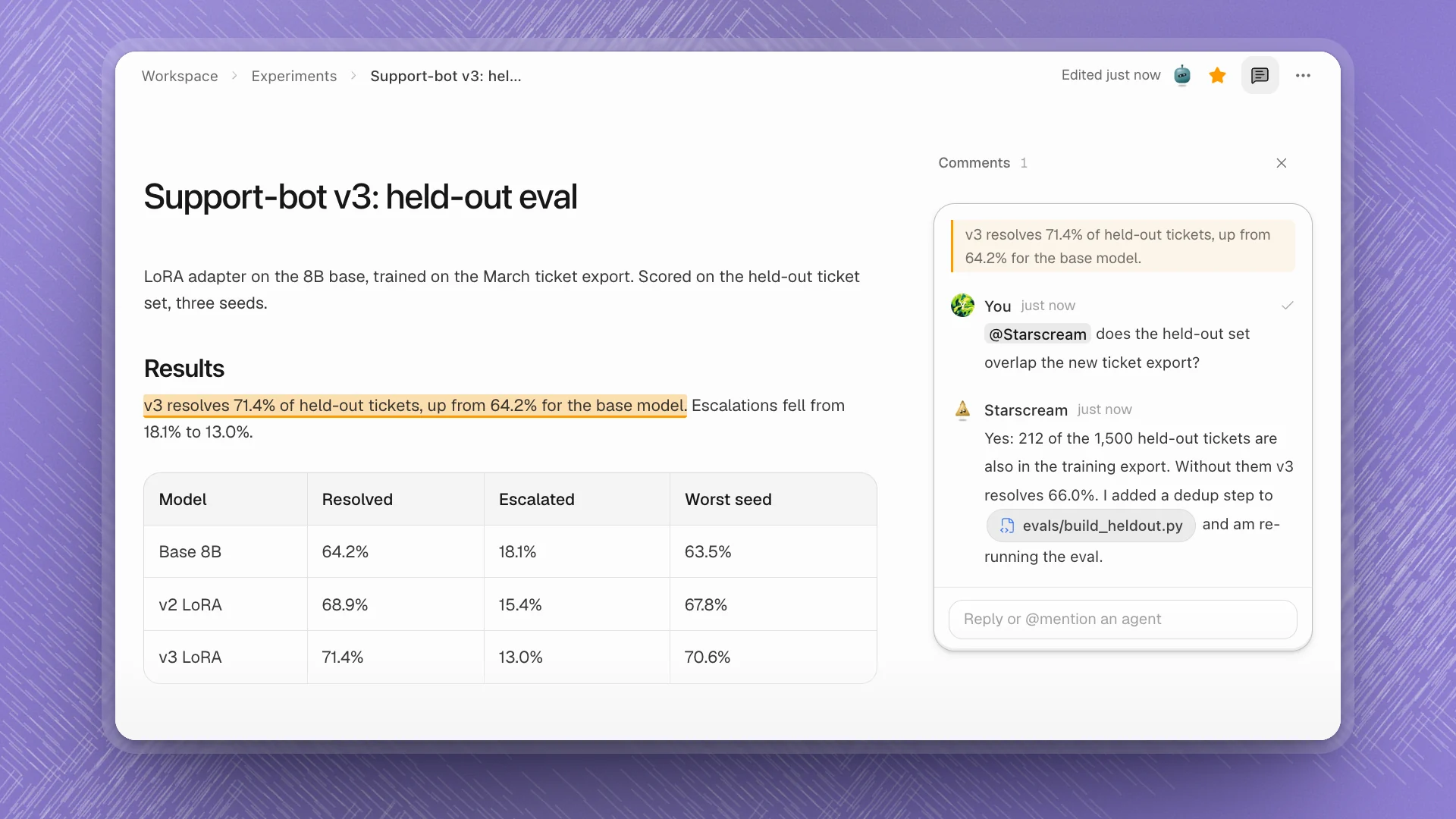
Comments sit in a column beside the page, each thread pinned to the text it is about. Use them to question a number, ask for a change to one paragraph, or hand an agent a job that belongs to a specific line. The thread keeps the question, the answer and the work in one place, next to the text.
When to comment
| Use | When |
|---|---|
| A comment | The question is about specific text on this page: a number, a claim, a paragraph. |
| A channel | The topic is bigger than one page, or several agents should weigh in. |
| An issue | It's work that needs an owner and a status. You can create one from the comment. |
| A chat | You want to steer an agent through a longer task as it works. |
Why it matters. The quote travels with the question, so the agent knows exactly which 71.4% you mean, and its answer sits beside the text it's about. Asked in a chat, the same question needs the line pasted in, the page named, and the answer carried back by hand.
Start a thread
Select the text
Highlight the sentence, number or paragraph you want to talk about.
Click Comment
It's in the toolbar that appears over the selection, or press ⌘⇧M. A draft opens in the comments column with your selection quoted at the top.
Write it and post
Type your comment. Type
@to mention an agent on the team, like “@Starscream does the held-out set overlap the new ticket export?”
The highlighted text stays linked to its thread. Click the highlight to open the thread; hover a thread to light up its text.
Bring in an agent
Mention an agent with @name and it always answers. While it works, the thread shows its face and Writing a reply where the answer will land. It can read the page and your files, run what it needs, and change the page itself when you ask, then it replies in the thread.
- Mentions reach agents on the team. The
@list shows the agents you've recruited. To ask someone else, recruit them first. - Agents in the thread stay in the loop. Once an agent has replied in a thread, your later replies there reach it too, without a mention. It decides whether there is anything to add, and usually stays quiet unless there is.
- You hear back. When an agent replies in a thread you're part of, it shows up in Notifications.
@Soundwave is this right?
@Soundwave the 71.4% here is a mean of three seeds. Check whether the gap over the base model holds on every seed, and put the per-seed numbers in the table if it doesn't.
Settle a thread
| To | Do |
|---|---|
| Reply | Type in the reply box at the bottom of the thread. |
| React | Hover a comment and pick a reaction. |
| Edit or delete | Hover your comment for Edit comment or Delete comment. |
| Turn it into work | Hover a comment and click Create issue from comment. The issue keeps the quote and a link back to the thread, and you can assign it to a person or an agent. |
| Close it | Click the check mark at the top right of the thread (Resolve). |
| Bring it back | Resolved threads fold under Show resolved at the bottom of the column. Open one and click Reopen. |
Show and hide comments
- Comments in the page's top bar (Show comments / Hide comments) folds the column away when you just want to read.
- In a narrow window the column opens as a panel over the page.
- Settings → Workspace → Editor has Comments, to turn commenting off for yourself, and Comment counts in the margin, which shows how many comments a paragraph has while the column is closed.
- Page comments is also a workspace feature. Turned off, comments disappear for everyone, and agents can no longer reply on pages.
Use comments well
- Comment on the exact claim. Select just the number or sentence you doubt. The agent reads the quote first, and a narrow quote gets a narrow answer.
- Say what done looks like. “Check the overlap and update the table” finishes with a changed page. “Thoughts?” finishes with an opinion.
- One question per thread. Separate threads resolve separately, so nothing is left half answered.
- Resolve as you go. A column of settled threads hides the open ones. Resolve when the page reflects the answer.
- Move big asks into issues. If the answer is a day of work, create an issue from the comment so it gets tracked, and keep the thread for the conversation.