Pages
LaTeX documents
Write papers in LaTeX with the compiled PDF beside the source, line-numbered errors, and agents that can compile and fix them.
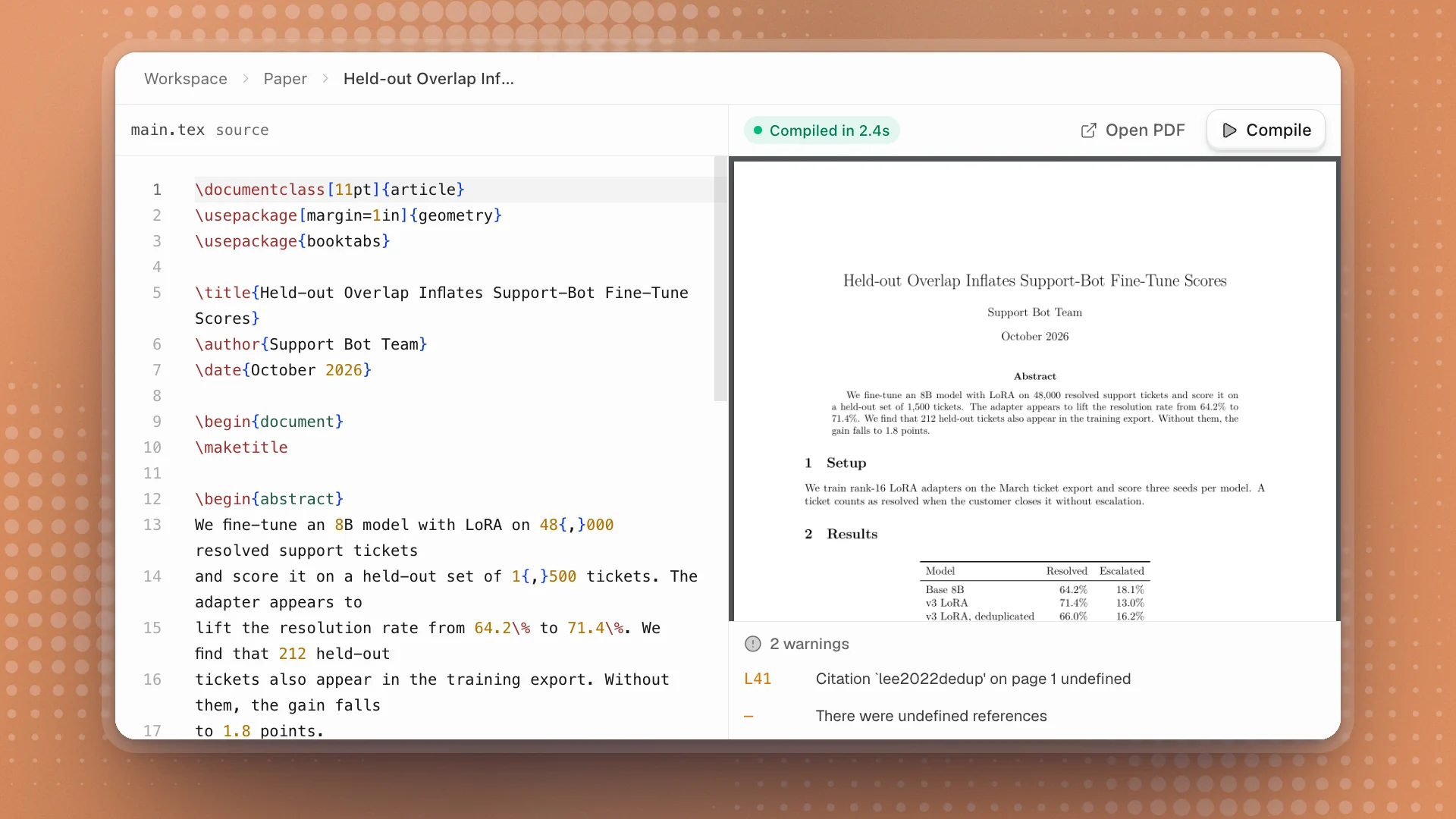
When the results are ready to become a paper, write it in the workspace. A .tex file opens with the source on the left and the compiled PDF on the right. It compiles when you open it and again every time it saves, so the PDF keeps up as you type.
When to use it. When the work is heading for a paper or a submission, or needs what LaTeX does best: equations, citations, a venue's template. For internal results logs and write-ups, a Markdown page is quicker to write and for agents to update.
Why it matters. The paper sits in the same workspace as the runs and pages it reports. An agent can pull the numbers from the results page and recompile in one step, and you see errors with their line numbers as you write.
Write a paper
Open or create a .tex file
.texfiles show in the Workspace tab, named by their\title, and in the Code tab. No paper yet? Ask an agent to start one from your pages.Write
Edit the source on the left. The page saves as you type, and each save starts a new compile.
Read the result
The top of the PDF panel shows the compile state: Compiling…, Compiled in 2.4s, or Failed. Errors and warnings are listed under the PDF with the line they point at, and lines with errors are marked in the source.
Share it
Open PDF opens the compiled file on its own, full size. Compile runs it again by hand.
Start a paper in paper/main.tex from the Support-bot v3 held-out eval page. Use the article class, put the results table in, compile it and fix any errors until it builds clean.
Reading errors and warnings
| You see | It means |
|---|---|
| A red line number, such as L12 | An error on that line. The PDF may be missing or out of date until it's fixed. |
| An amber line number | A warning, such as an undefined citation or reference, or a line that runs past the margin. The PDF still builds. |
| — instead of a number | A message about the whole document, such as “There were undefined references”. |
| compiles via main.tex beside the file name | You're editing a section file. It compiles through the main document that includes it. |
The first compile of a new document downloads the LaTeX packages it uses and can take a minute. After that, compiles take a second or two.
Let agents do the busywork
Agents compile with the same engine and get the same line-numbered errors, so they can fix a document until it builds clean. Good jobs to hand off:
- Fix the build. “Compile paper/main.tex and fix every error and warning.”
- Keep numbers in sync. “Update Table 1 from the latest Results page.” The paper then matches the runs you trust.
- Format results. “Turn the per-seed results into a booktabs table with the mean and worst seed.”
- Tidy references. “Add BibTeX entries for every
\citethat's undefined and recompile.”
Good to know
- The PDF and log live in your workspace, under
.optimus/latex/, in folders that mirror your source. Point collaborators or tools there, or use Open PDF. - Split long papers. Keep each section in its own file and include them from
main.tex. Opening any section still compiles the whole paper. - LaTeX runs on your computer, in the desktop app, for workspaces on this machine.
- LaTeX documents is a workspace feature, on by default. Turned off,
.texfiles open as plain text and agents can't compile them.